 melta
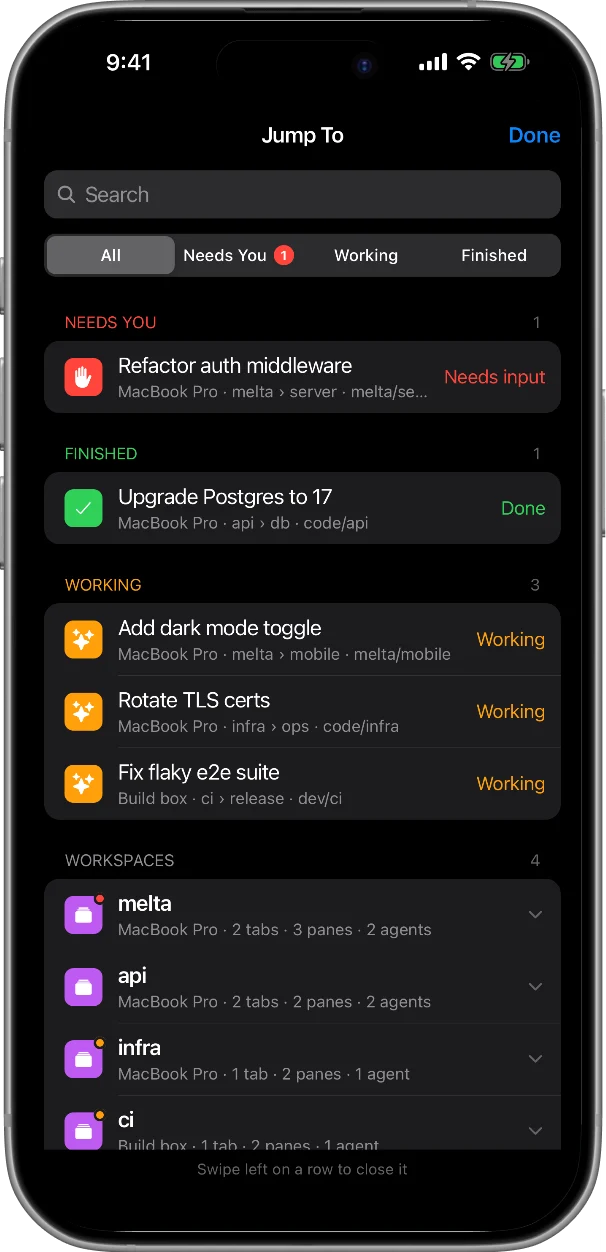
Jump To
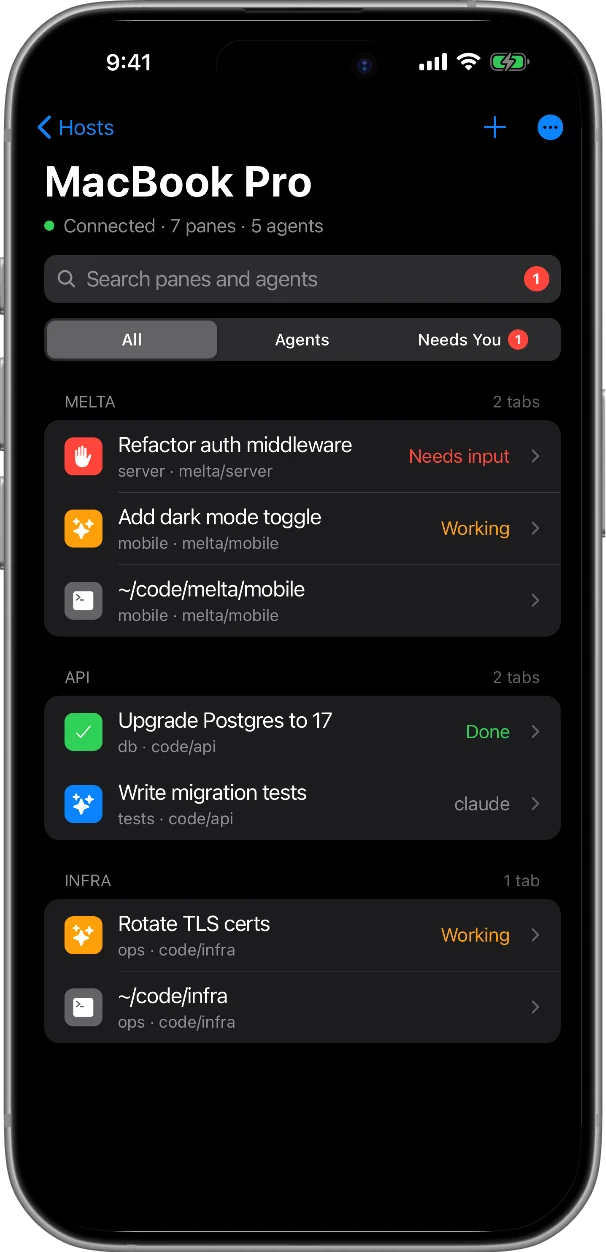
Search every pane and agent across your connected computers. What needs you, what's finished and what's working sit at the top.
Jump to any pane in one tap, chat with Claude Code and Codex, and get a push the moment an agent needs you. Melta connects straight from your phone to your computer over SSH.
Free No relay server: SSH runs on your phone iPhone and Android
01 / Features
Search every pane and agent across your connected computers. What needs you, what's finished and what's working sit at the top.
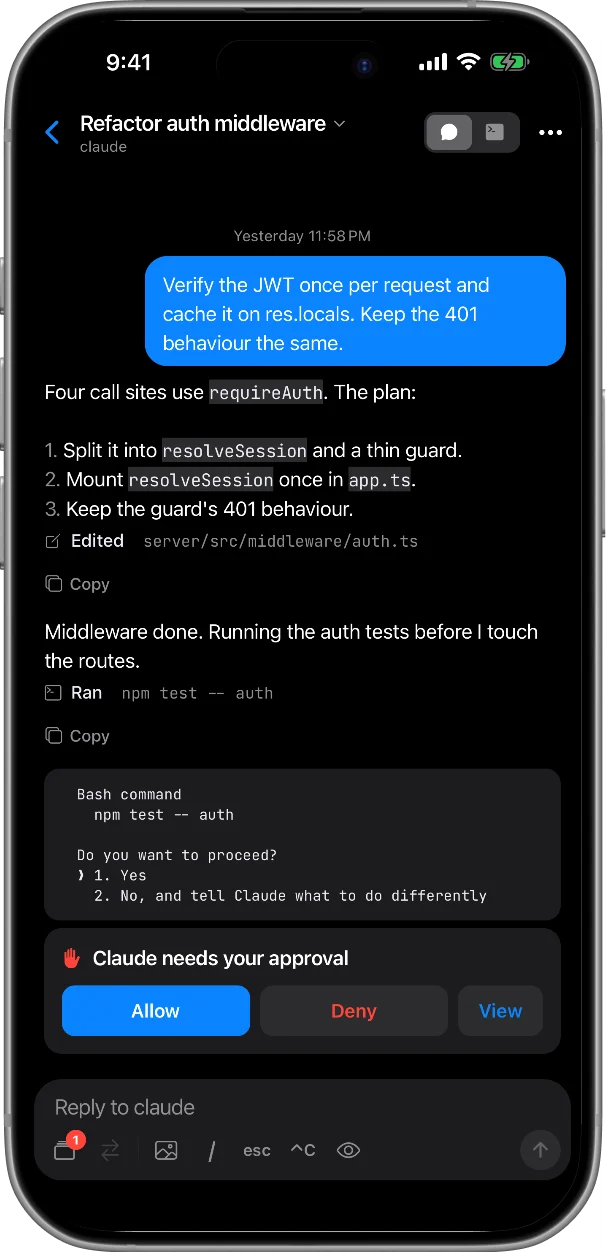
Claude Code and Codex as a conversation, read from the agent's own session log, with every edit and command it runs.
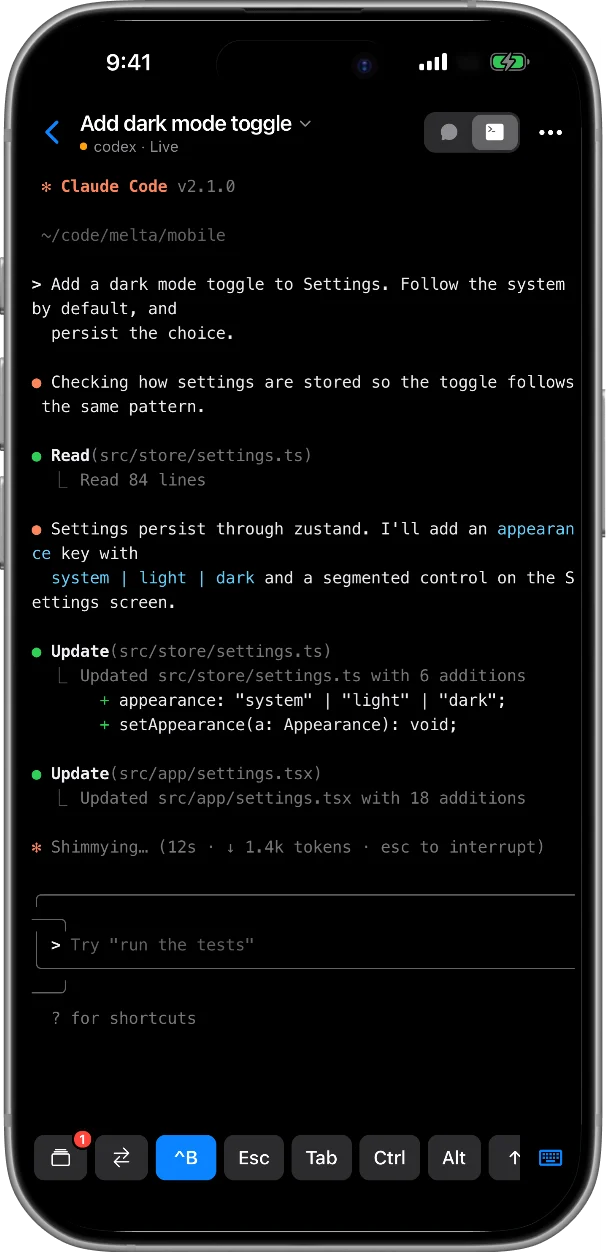
When an agent stops to ask, answer with one tap. For anything else, a live screen gives you arrow keys, 1 2 3, Return and Esc.
A push when an agent is blocked or finished, straight from Herdr's agent state. Allow or deny right from the notification.
One key flips between the two panes you're working in, each in the view you left it, like alt-tab for your agents.
Every pane opens full screen. Jump To, last pane and your Herdr prefix sit above the keyboard, next to keys you can reorder.
Tap / for the agent's commands, with model presets for /model. No hunting for the right characters on a phone keyboard.
Lose the signal and Melta retries, then reconnects when you come back to the app. On Android it keeps the connection while the app is in the background.
Send a link to a read-only copy of an agent conversation, for a code review, a bug report or a teammate.
02 / Mobile first
Most mobile terminals show your whole multiplexer in a tiny window, and you steer it with key chords. Melta talks to Herdr directly, so every pane gets the full screen and switching is a tap.
03 / Setup
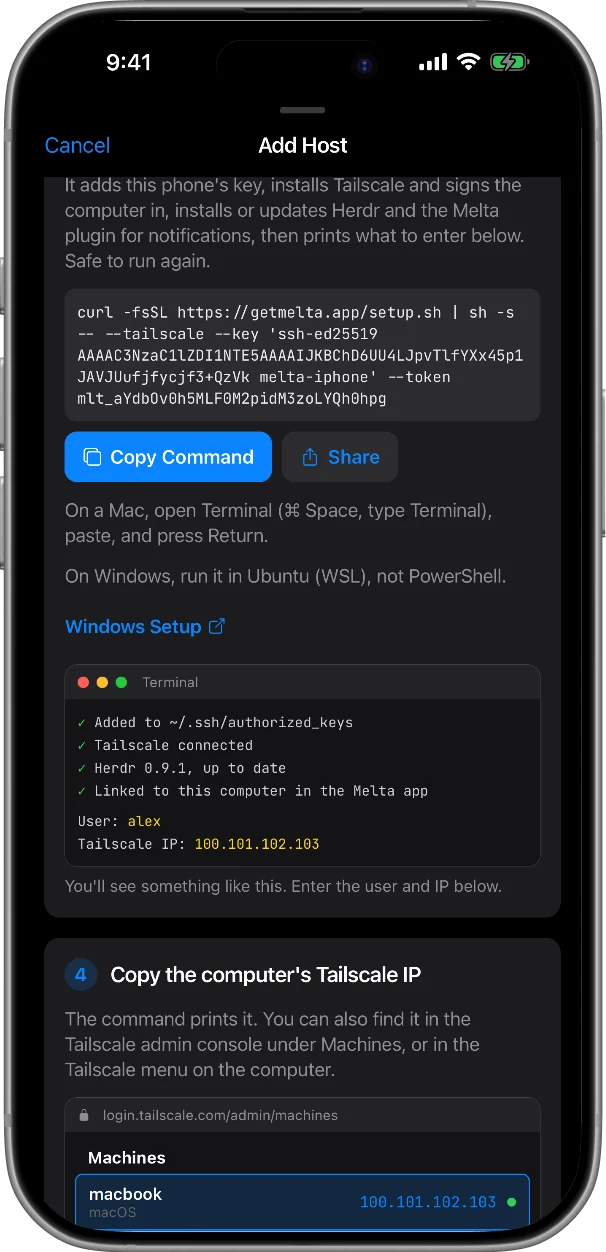
Melta makes a key for your phone and shows one command to paste into your computer's terminal. Run it again any time; finished steps are skipped.
Install the Tailscale app on your phone and sign in; the setup command installs it on your computer. You reach your computer from any network, with nothing opened to the internet. Or use any SSH route you already have.
On a Mac, turn on Remote Login first (System Settings › General › Sharing). The command adds your phone's key, installs Tailscale, installs or updates Herdr and the notification plugin, and prints what to enter.
$ curl -fsSL https://getmelta.app/setup.sh | sh -s -- --tailscale --key '…' --token …
Runs in a macOS or Linux terminal. Windows has its own line for PowerShell, one command that does it all: Windows setup.
Type the Tailscale IP and user name it printed. Your panes and agents show up right away. Read the docs for every step.
04 / Your machine, your keys
SSH, phone to computer, end to end
When an agent needs you or finishes: pane name, its question or last message
05 / Compare
Moshi is the more complete, more mature app. Melta does one thing: a phone-first client for Herdr. Here is the short version.
| Feature | Melta | Moshi |
|---|---|---|
| Built around | Herdr: a native pane list, each pane full screen | tmux, Zellij and Herdr in the terminal view |
| Connection | SSH, reconnects when you return to the app | SSH, Mosh, ET |
| Agent chat | Claude Code and Codex | Many agents; experimental, part of Moshi Pro |
| Runs on your computer | Nothing extra. Notifications use a small Herdr plugin script | moshi-hook, a helper that serves chat and notifications |
| Setup | Phone makes the key; one pasted command does the rest | Add a host with your SSH key, install moshi-hook |
| Extras | Slash-command menu, reorderable key bar, one-button prefix | Voice input, diff viewer, file browser, Apple Watch |
| Price | Free | Free to start; Pro from $7.99 a month (US) |
Moshi details are from its own site and App Store listing, checked October 2, 2026. If you use tmux or Zellij, or need Mosh on the move, Moshi is the better fit. Read the full comparison.
06 / Free tools
They run in your browser. Nothing you type leaves the page.
07 / FAQ
Yes. Melta is free. Join the waitlist and we email you the download links when your spot opens up.
Yes. Melta is a client for Herdr, a terminal multiplexer built for coding agents: like tmux, but it knows which pane is an agent and whether it's working, blocked or done. The setup command installs or updates it for you. Melta isn't a general SSH client for servers without Herdr.
Your terminal and chat sessions don't: SSH runs on your phone and connects straight to your computer. Two things do reach our server. When an agent needs you or finishes, your computer sends the pane name and part of that pane's screen, so the notification can show the question, or what the agent said last. And a chat is stored there only if you choose to share it. What the server stores lists everything.
The chat view supports Claude Code and Codex, read from each agent's own session log. Any other agent, or anything else you run, works in the terminal view of its pane.
No, but it's the easy way to reach your computer from any network without opening ports. Any SSH route works: a public IP, a VPN, or the same Wi-Fi. See Tailscale SSH from your phone.
Yes. One setup line in PowerShell turns on Windows' SSH server and installs Herdr in Ubuntu (WSL), where your agents run, and keeps it running. The Windows setup guide walks through it.
No, it uses plain SSH. Herdr keeps your sessions alive on the computer, and Melta reconnects when you come back to the app.
No. Your computer has to be awake and reachable. Keep a Mac awake for SSH covers the settings that help.
Melta is free, for iPhone and Android. Join the waitlist and we email you the download links when your spot opens up.
Until then, read the docs or see every way to run Claude Code from your phone.